Showing posts with label Cricut Design Space. Show all posts

Saturday, February 6, 2016

Cricut Explore: Saturday Seven

Here is the latest installment of my Cricut Explore Saturday Seven files!  I will share 7 new files that I create during the week for you to use.  You are welcome to edit the files to fit your needs.  Please contact me if you need help on how to edit the files.  Let’s get started with the files for this week.  I have included a screen shot of the file and then the link to the file.  Enjoy.  Please comment and let me know what you make with the files!


1. Coffee Wedding Sticker.  You can find this file here.   This sticker would be great for a coffee type wedding favor.   #WeddingSticker #CricutExplore #CricutExploreSaturdaySeven
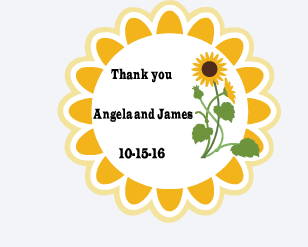


2. Sunflower Wedding Sticker   You can find the link HERE.  This sunflower wedding sticker would be great for fall weddings.  Change it to customize for other events. #SunflowerWeddingSticker #WeddingSticker #DIYWedding #CricutExplore

3. Robot Valentine Heart.   My neighbor asked me to make the heart image on this cute "Robot" Valentine's Gift.  She is making these for her daughter's class.  They are so cute!   Here is the link to the heart image in the first picture HERE! #RobotValentine #DIYValentine #CricutExplore


4. Functional Calendar or Planner Stickers   Here is the link to this set of stickers.  I am on a serious sticker kick.  I promise to eventually move on to something new.  I have not tried to cut these yet.  Please comment below and let me know if they cut out correctly.  LOL  #PlannerStickers #Planners 


5. Valentine Card  This card is in the subscription minus the lips and additional hearts and personalization.  I used the new "Dear John" font for the name.  Here is the line to the project. You can add your own touch to any Make It Now project.  


6. Print and Cut Feature Valentine's Card.  This card will use print and cut and write feature.  Make sure you have a black and red pen.  Here is the link HERE


7. Best Friends Card.  This card could be colored in.  It is a super simple card.  You will need a black pen for this card.  Here is the LINK #FriendshipCard 


Saturday, January 16, 2016

Saturday Seven!

Here is the latest installment of my Cricut Explore Saturday Seven files!  I will share 7 new files that I create during the week for you to use.  You are welcome to edit the files to fit your needs.  Please contact me if you need help on how to edit the files.  Let's get started with the files for this week.  I have included a screen shot of the file and then the link to the file.  Enjoy.  Please comment and let me know what you make with the files!


https://us.cricut.com/design/#/canvas/35390902

I designed this file as a sticker sheet.  #CricutExplore #PatrioticPlannerStickers


https://us.cricut.com/design/#/canvas/35539272    I designed this file for a co-worker's baby shower.  You can unflatten and edit to fit your needs.   #CustomBabyShowerSticker #CricutExplore

https://us.cricut.com/design/#/canvas/35506394   I am on a sticker kick!   This sticker would make a wonderful addition to a fall wedding. Use it for wedding favors.  You could adjust it and use it for an anniversary celebration.   Have fun with it.  Please comment below with a link to your creation.  I would love to see what you make with this!  #FallWeddingSticker #CricutExplore


https://us.cricut.com/design/#/canvas/35579193  This was a fun sticker or print and cut project.  You could use this for stickers or print it out for a cute valentine for kids.  You could also resize and use on a card front.  Add layers for the card front and make a cute card.  #CricutExplore #FlamingoHeartSticker #PlannerStickers


https://us.cricut.com/design/#/canvas/35599852  I am not sure that this file will be truly shareable due to the flamingo images.  I have included the PNG that I used.  Right click and save it.  Upload to Design Space using Complex.  You can insert in your own card and add your text!  Easy and quick!  Contact or leave a comment if you have any problems with this card.  

https://us.cricut.com/design/#/canvas/35601317 Here is a pun type card.  It is so corny and will surely make you smile!  Have fun with this and create your own corny cards! #CricutExplore


https://us.cricut.com/design/#/canvas/35601317  I hope you like this card!  It would be great for Valentine's Day!   Please comment below with a link to your projects!  I would love to see what you do with any of my #SaturdaySeven files.  


Tuesday, July 14, 2015

Cricut Explore: Vinyl

I made this very quick and easy coffee cup using the Cricut Explore.  I know what I am making for presents now.  The Dollar Tree is an excellent place to  buy items to learn how to work with vinyl.  You won't  waste a lot of money on an item that is not perfect.  I have bought steins, mugs, cups with straws and much more at The Dollar Tree to practice vinyl application.  Have fun and let me know what you create.

#CricutExplore #Cricutvinyl #CricutEverywhere

Tuesday, May 26, 2015

Cricut Explore : Vinyl


Here is the last project we worked on today.  I love bees.  I have always wanted a coffee cup with a bee on it.  My son and I crafted together on Memorial Day.  It was rainy and stormy in the DFW, Texas area.  It has been stormy and rainy for the last month or more.  It is amazing how much rain, flooding, tornadoes and wind we have had over this time period.  Our area suffered a drought for many years.  It is now over.   It was a perfect day to craft.  


My son found this image by doing a google search.  He searched for "intricate bee".  This was the best one.   He converted it in Cricut Design Space.  He added the yellow circle and oval from Cricut Design Space images.   He sized the circle and oval to fit the open areas in the bee.  


We cut out the bee and realized it was very big.  We had to use it regardless of the size for the cup!   I love it!   I weeded the bee and my son layered the bee on the yellow circle and oval.    I believe all the projects we made it the past two days could make wonderful gifts.   I know what I am doing for gifts!  #CricutEverywhere #CricutVinyl #CricutExplore


Sunday, May 24, 2015

More Cricut Vinyl Projects

I made a few more projects with the Cricut vinyl and the Cricut explore. The Cricut Explorer is an amazing tool. I can see how I can make a ton of gifts with this machine. It makes it incredibly easy to make just about anything. This project was incredibly easy. I bought the cup at the Dollar Tree. this cup is for my son's girlfriend. She loves elephants. I doubt that she has a personalized item. She has such a unique name and I am sure personalization is limited. this was super easy to make. The file came from Cricut. It is part of the design space program. #CricutExplore #Cricutvinyl #CricutEverywhere

Thursday, February 12, 2015

Free Cricut Design Space File: Valentine's Day Tags


Cut out these great tags for all of your Valentine's Day Projects!

https://us.cricut.com/design/#/canvas/project/23508851

#CricutExplore #FreeCricutExploreFiles #CricutExploreFile

Wednesday, February 11, 2015

Free Cricut Design Space File: Custom Champagne Tags

I created this using the Cricut Design Space software.  
This file can be cut out using the Cricut Explore.
https://us.cricut.com/design/#/canvas/project/23719476

#Cricut Explore #FreeCricutExploreFiles

Monday, February 9, 2015

FREE Cricut Design Space File : Wrap It up Rose Tag


I created this using the Cricut Design Space software.  
This file can be cut out using the Cricut Explore.

#Cricut Explore #FreeCricutExploreFiles