#HappyPlanner #CricutExplore #PlannerStickers #Planners

This blog features articles about paper crafts using my Cricut machines! DIY crafts using items bought from Dollar Tree stores
Showing posts with label Planners. Show all posts
Showing posts with label Planners. Show all posts
Tuesday, March 8, 2016
Cricut Explore: Happy Planner Easter Sticker set
#HappyPlanner #CricutExplore #PlannerStickers #Planners


Sunday, March 6, 2016
Cricut Explore: Happy Planner Zebra Sticker Set
\
I am changing things up with the Saturday Seven files. I will post videos instead throughout the week showing new designs. Here is the file for this sticker layout. You need to cut it out on a Cricut Explore machine. https://us.cricut.com/design/#/canvas/37586548
#HappyPlanner #CricutExplore #ZebraStickerSet #plannerstickers
Saturday, March 5, 2016
Saturday Seven: Cricut Explore Files
I have completed things in a different manner today. I am focusing on the Happy Planner and weekly themes. I have included 3 videos on how to decorate your planner weekly. Here is the first theme. Once again, I won't have 7 files today due to the 3 videos I produced today. Please comment below if you want a certain design. I will design it and post it next Saturday!
1. Strawberry Sticker Set: https://us.cricut.com/design/#/canvas/37566767
2. Butterfly Theme Sticker Set https://us.cricut.com/design/#/canvas/37563250
3. Easter Sticker Set https://us.cricut.com/design/#/canvas/37572124

4. More Easter Stickers https://us.cricut.com/design/#/canvas/33708451

Sunday, February 7, 2016
Saturday, February 6, 2016
Cricut Explore: Saturday Seven
Here is the latest installment of my Cricut Explore Saturday Seven files! I will share 7 new files that I create during the week for you to use. You are welcome to edit the files to fit your needs. Please contact me if you need help on how to edit the files. Let’s get started with the files for this week. I have included a screen shot of the file and then the link to the file. Enjoy. Please comment and let me know what you make with the files!

1. Coffee Wedding Sticker. You can find this file here. This sticker would be great for a coffee type wedding favor. #WeddingSticker #CricutExplore #CricutExploreSaturdaySeven
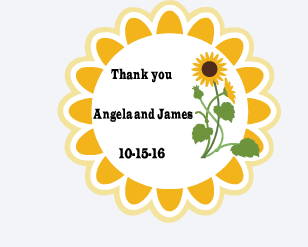
2. Sunflower Wedding Sticker You can find the link HERE. This sunflower wedding sticker would be great for fall weddings. Change it to customize for other events. #SunflowerWeddingSticker #WeddingSticker #DIYWedding #CricutExplore


3. Robot Valentine Heart. My neighbor asked me to make the heart image on this cute "Robot" Valentine's Gift. She is making these for her daughter's class. They are so cute! Here is the link to the heart image in the first picture HERE! #RobotValentine #DIYValentine #CricutExplore

4. Functional Calendar or Planner Stickers Here is the link to this set of stickers. I am on a serious sticker kick. I promise to eventually move on to something new. I have not tried to cut these yet. Please comment below and let me know if they cut out correctly. LOL #PlannerStickers #Planners

5. Valentine Card This card is in the subscription minus the lips and additional hearts and personalization. I used the new "Dear John" font for the name. Here is the line to the project. You can add your own touch to any Make It Now project.

6. Print and Cut Feature Valentine's Card. This card will use print and cut and write feature. Make sure you have a black and red pen. Here is the link HERE

7. Best Friends Card. This card could be colored in. It is a super simple card. You will need a black pen for this card. Here is the LINK #FriendshipCard
Sunday, November 29, 2015
Altered Paper Clips: Bee Theme
I decided I wanted to make a bee themed altered paper clips. I love making the paper clips. . I designed them in Cricut design space. The file will be posted at the end of this post.
I want to provide some helpful hints on how to complete these bees. Make sure you have an extra mat that you can actually glue all of the pieces together. It makes it so much easier to put these together. You also want to use the custom dial setting intricate cut and a sticky mat. Use your spatula tool to pull the images off the sticky mat. I use a less sticky mat to put the images together. I hope this makes sense. You can find this file at https://us.cricut.com/#/canvas/33484462
#Cricut Explore #Planners


Subscribe to:
Posts (Atom)